Five days ago i bought a cable for USB Extension. I haven't been able to try it out until yesterday and i found out it was broken, since my USB couldn't be detected at all. I was using Slackware Linux on my office and i never thought it was Linux's fault. So i tried to test it on my colleague's laptop who's using Macintosh and Windows and they ended with the same result: the USB wasn't recognized.
Today i went back to the computer store and ask for replacement. They said that cables doesn't have warranty. I told them that in the receipt i got, every item which has low prices are guaranteed for two weeks. So she said that they will replace it, but only once and it will be a shorter cable. I said OK, so we agreed. Since it's only one time replacement, i went to the neighbor of this store which is a sub division for services. I asked them to try the new one and it failed. They gave a replacement and let me tried it but everything failed. I got a replacement three times, until finally they gave a better cable for me (i think they grab it from other product) and it was more expensive than mine, but it's definitely shorter, but it works (finally). So i decided to take those without any charges at all. It's a black one, similar with my computer's casing on my office.
Here's the result from Linux's dmesg:
usb 2-2: new high speed USB device using ehci_hcd and address 2
usb 2-2: configuration #1 chosen from 1 choice
Initializing USB Mass Storage driver...
scsi2 : SCSI emulation for USB Mass Storage devices
usb-storage: device found at 2
usb-storage: waiting for device to settle before scanning
usbcore: registered new interface driver usb-storage
USB Mass Storage support registered.
scsi 2:0:0:0: Direct-Access Kingston DataTraveler 2.0 1.00 PQ: 0 ANSI: 2
sd 2:0:0:0: [sda] 1001472 512-byte hardware sectors (513 MB)
sd 2:0:0:0: [sda] Write Protect is off
sd 2:0:0:0: [sda] Mode Sense: 0b 00 00 08
sd 2:0:0:0: [sda] Assuming drive cache: write through
sd 2:0:0:0: [sda] 1001472 512-byte hardware sectors (513 MB)
sd 2:0:0:0: [sda] Write Protect is off
sd 2:0:0:0: [sda] Mode Sense: 0b 00 00 08
sd 2:0:0:0: [sda] Assuming drive cache: write through
sda: sda1
sd 2:0:0:0: [sda] Attached SCSI removable disk
usb-storage: device scan complete
sd 2:0:0:0: Attached scsi generic sg0 type 0
usb-storage: waiting for device to settle before scanning
usbcore: registered new interface driver usb-storage
USB Mass Storage support registered.
scsi 2:0:0:0: Direct-Access Kingston DataTraveler 2.0 1.00 PQ: 0 ANSI: 2
sd 2:0:0:0: [sda] 1001472 512-byte hardware sectors (513 MB)
sd 2:0:0:0: [sda] Write Protect is off
sd 2:0:0:0: [sda] Mode Sense: 0b 00 00 08
sd 2:0:0:0: [sda] Assuming drive cache: write through
sd 2:0:0:0: [sda] 1001472 512-byte hardware sectors (513 MB)
sd 2:0:0:0: [sda] Write Protect is off
sd 2:0:0:0: [sda] Mode Sense: 0b 00 00 08
sd 2:0:0:0: [sda] Assuming drive cache: write through
sda: sda1
sd 2:0:0:0: [sda] Attached SCSI removable disk
usb-storage: device scan complete
sd 2:0:0:0: Attached scsi generic sg0 type 0
Showing posts with label USB. Show all posts
Showing posts with label USB. Show all posts
Friday, January 18, 2008


Thursday, January 10, 2008
USB 3.0
This year, we will have a new faster peripheral connection by the availability of USB 3.0, peripheral interconnect technology that has been used by every users around the world. USB 3.0 is set to deliver a data transfer rate of up to 4.8Gbps - ten times today's 480Mbps USB 2.0 data rate - and introduce optical interconnects to the bus. The goal, the companies behind the specification said, is to create a version of the bus that's able to deliver files of 25GB or more (that's quite ambitious, but i believe it's common thinking, since multimedia files are being common thing and it's growing all the time).
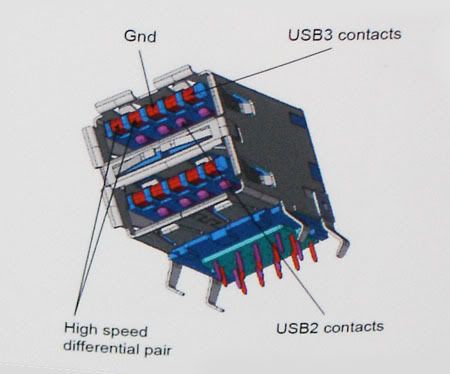
The third version will have it's own name, called SuperSpeed USB and it will be backward compatible with the previous 1.1 and 2.0 version
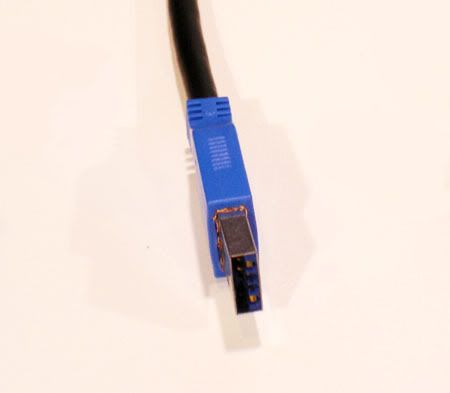
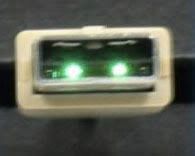
There will be two connectors for the USB 3.0 devices, electrical and optical. You can look for the images below. The first one is the electrical and the second one (smaller) is the optical version. The third picture will show the diagram why it would be backward compatible with the previous version.
Reference:
http://www.reghardware.co.uk/2008/01/09/ces_usb_3_revealed/
http://www.reghardware.co.uk/2007/09/19/idf_usb_3_announced/


The third version will have it's own name, called SuperSpeed USB and it will be backward compatible with the previous 1.1 and 2.0 version
There will be two connectors for the USB 3.0 devices, electrical and optical. You can look for the images below. The first one is the electrical and the second one (smaller) is the optical version. The third picture will show the diagram why it would be backward compatible with the previous version.
Reference:
http://www.reghardware.co.uk/2008/01/09/ces_usb_3_revealed/
http://www.reghardware.co.uk/2007/09/19/idf_usb_3_announced/
Subscribe to:
Posts (Atom)