Showing posts with label Yahoo Messenger. Show all posts

Saturday, June 20, 2009

Pidgin and Yahoo

Several people that uses Pidgin (mostly Linux users) are complaining that they couldn't logged in to their Yahoo account. It's NOT Pidgin's fault, but due to recent notifications from Yahoo that they are planning to retire old version of their IM client application on August. Some servers has been upgraded with new authentication method which current Pidgin (2.5.6) hasn't implemented yet.

So, what's the solution?

Simple. Just follow this link and you will find the suitable solution. I have tested it and it's confirmed to work thumbs up

Thursday, September 25, 2008

Yahoo Messenger 9

Finally, the final version of Yahoo Messenger 9 is out. There hasn't been too much publication in the last three months and suddenly, it just came out like that. What's nice in this major version is that it supports for Indonesian language as well (i am not sure whether YM 8.x has it or not).

By the way, YM 9 may bring bad news for Vista users, since some features are not available on Vista (and MAC users). Check the feature list for more detailed information. It's just a matter of time before those features are adopted in Vista and Mac, but for now, XP users will be pleased to see that they could get the best of YM 9.

One cool thing about YM 9 is that they add several new emoticons (like , and ) and also they had Star Wars edition of Web Messenger

Wednesday, September 10, 2008

YM Contact Limit?

In the last few weeks, i'm unable to add more friend to the YM contact list. When i wanted to add them to specific group, Pidgin always displayed an error saying that it couldn't add it to the group. I'm thinking that it might be YM's limitation. When i count my contact list, there were 1013 person on it silly

I deleted some contacts and now i'm able to re-add those who hasn't been added before. Any similar experience like this? Or is it just Pidgin's problem? IMHO it's Yahoo's limitation.

In the past, Priyadi already post about this, but then the limit was raised. If i'm not mistaken, it was 600 contacts at that time, and now i have reached 1000. Perhaps i do have to delete some of the contacts.

Saturday, June 07, 2008

Joining Chat Room on Pidgin

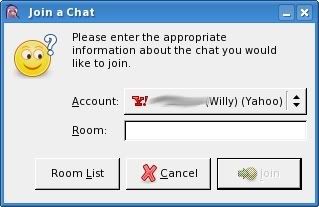
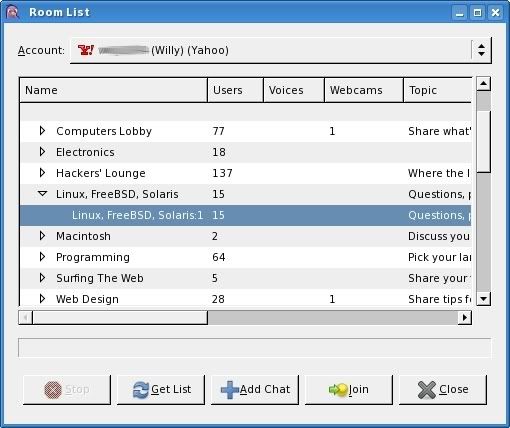
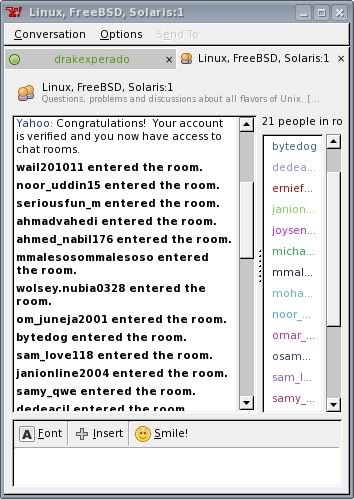
Some people asked about Pidgin capabilities to join a chat room. I never used Chat Room before in YM nor Pidgin. So i tried to do some small testing on my Slackware box. First thing, click on Buddies > Join a Chat on Pidgin's main window. You will be asked what room you are joining (first screenshot). If you are unsure or you don't know what room to join, just click on the Room List and you will lots of rooms there (second screenshot). Just pick one of them and you will see an empty chat room filled with text from Yahoo Chat (third screenshot).

Go to the URL provided and entered the random CAPTCHA text there to prove that you are human big grin

When you have entered the text, your account will be activated and you can start to chat on the room. Unfortunately, this steps will have to be taken each time you entered a room (even the same room in the future). I know it's daunting, but it's true. I don't know why they do this (i'm not sure YM users will have to do this).


Sunday, March 02, 2008

Nice Feature of Pidgin

Since i'm using Linux all the time lately, it doesn't mean that i'm offline from instant messaging-based communication. I use Pidgin for my daily application for instant messaging as it supports multi protocol (even though i usually login only to YM protocol).

Once nice thing that i like in Pidgin besides the openness of the application is that it's easier to move one person to another group compared to Yahoo Messenger. In YM, you will have to drag the person to the correct group. This is easy to be done, but what if your friends are way too much? You will have to drag it way down below / up too long before you reach the group.

Pidgin offers a nicer way, by offering a menu to move a person from one group to another group. All you need to do is right click the person in the Buddy List and select Move To > and it will show you a list of all groups you have. Just click on the group you wanted and bingo... your contact has been moved to another group. As simple as that.

I believe that Yahoo team can do this and i hope it will be integrated in the next Yahoo Messenger 9

Tuesday, October 30, 2007

Yahoo Messenger Beta

Yahoo is working on a beta version of Yahoo Messenger that tried to bring new Yahoo Messenger on desktop application. So far, the new features that are written on the site are:
- New Look
- New Emoticons
- New Skins
- Usage of Flickr to swap photos

I guess it's more than that. It's just a matter of time before they publish the new features list big grin For now, check the video first.

The bad thing is that they didn't make an effort to update the Unix version of Yahoo Messenger. People have preferred Pidgin or Kopete rather than using old-fashioned Unix version of Yahoo Messenger