Showing posts with label Pidgin. Show all posts
Showing posts with label Pidgin. Show all posts
Wednesday, June 08, 2011
Pidgin 2.8.0 Released
After months of development, finally Pidgin has released a new major release, 2.8.0. Their last release was three months ago, which is uncommon for an active open source project to have this long delay. Anyway, it's worthed to wait, since it's a new major release and there are a lot of new improvements on voice/video support along with many code cleanups, better NetworkManager interoperability, many updates on multiple plugins, and the last but not least: removal of QQ plugin since it's no longer working and has been unmaintained for some time. More to tell on the ChangeLog


Friday, October 22, 2010
Pidgin 2.7.4 Fixes Many Bugs
For some time, Pidgin users are left with bugs lurking on 2.7.3, but that will (hopefully) ends now, since Pidgin developers has released 2.7.4, the latest version which incorporates a bunch of bug fixes along with several security fixes that filled the Changelog.
Since it hasn't been released under -Current tree, i took an early step building it using SlackBuild from -Current and created the 2.7.4 for Slackware-Current. It works just as expected and i'm now running 2.7.4.
For those who have used Pidgin, please be patient as it will be released on -Current soon (hopefully with the next batch of updates).
Since it hasn't been released under -Current tree, i took an early step building it using SlackBuild from -Current and created the 2.7.4 for Slackware-Current. It works just as expected and i'm now running 2.7.4.
For those who have used Pidgin, please be patient as it will be released on -Current soon (hopefully with the next batch of updates).
Thursday, February 18, 2010
Pidgin 2.6.6
Wednesday, August 26, 2009
SMS Limitation on Pidgin
You probably have known that Pidgin is now able to send text messages to cell phones using a global carrier. I have posted this before on this blog, but what i haven't mentioned on that post is the limitation for this service (since i am not aware of such things at that moment).
It seems that sender have a limitation around 5 text messages for a same number. Can you send more? Yes, you can, but the receiver must reply one of your text message and using the global carrier (which probably means international rate will be charged) and not replying to your cell phone number directly. This only applies to same number, so you can get another 5 messages to different number.
I hope this clarifies the SMS feature on Pidgin.
It seems that sender have a limitation around 5 text messages for a same number. Can you send more? Yes, you can, but the receiver must reply one of your text message and using the global carrier (which probably means international rate will be charged) and not replying to your cell phone number directly. This only applies to same number, so you can get another 5 messages to different number.
I hope this clarifies the SMS feature on Pidgin.
Saturday, August 22, 2009
Send SMS via Pidgin
Good news everybody. Now, Pidgin 2.6.0 and above will be able to send SMS messages and it's working in Indonesia also. At first, i thought it will only work in some countries (excluding Indonesia), but in fact, i just tried to send it to my own number (i'm using Telkomsel's Simpati card) and it's working.
I received a text message from 4246002 and i think it's the global carrier. It will have the format nickname: text message.
If you want to send text message via Pidgin, use Buddies > New Instant Message. Enter your buddie's phone number in form of
+<country code><phone number>
For example: +62123456789
Thanks to Sulabh Mahajan who implemented this feature on Pidgin 2.6.
We are looking for more features in Pidgin
PS: i only test it on Telkomsel. You might try to test it on other operators.
Update (8:44 AM): It works on XL and Three (3). Thanks to Regina
Update (8:47 AM): It works on IM3. Thanks to Bobby
Update (8:54 AM): It works on Mobile-8 (Fren). Thanks to my Mom
Update (9:24 AM): It works on Indosat. Thanks to my Feha
I received a text message from 4246002 and i think it's the global carrier. It will have the format nickname: text message.
If you want to send text message via Pidgin, use Buddies > New Instant Message. Enter your buddie's phone number in form of
+<country code><phone number>
For example: +62123456789
Thanks to Sulabh Mahajan who implemented this feature on Pidgin 2.6.
We are looking for more features in Pidgin
PS: i only test it on Telkomsel. You might try to test it on other operators.
Update (8:44 AM): It works on XL and Three (3). Thanks to Regina
Update (8:47 AM): It works on IM3. Thanks to Bobby
Update (8:54 AM): It works on Mobile-8 (Fren). Thanks to my Mom
Update (9:24 AM): It works on Indosat. Thanks to my Feha
Monday, June 29, 2009
Pidgin 2.5.8
It seems the Yahoo login problem is not yet finished, as there are some users are still having trouble logging in to Yahoo after upgrading to 2.5.7, so 2.5.8 is released which changed the default pager server to the new one, which will ease user to logged in to Yahoo servers again.
Get the new Pidgin release at their official home page
Get the new Pidgin release at their official home page
Sunday, June 21, 2009
Pidgin 2.5.7 Released
The Pidgin team has decided to release a quick update to Pidgin to fix the Yahoo login problems. There aren't much new features or fixed bugs on this version as this is probably an emergency release, but at least the login problem is now fixed after the new Yahoo protocol 16 is supported by Pidgin. They even had new HTTPS login method 
Here's the short Changelog of the newer version of Pidgin:
Here's the short Changelog of the newer version of Pidgin:
- Yahoo Protocol 16 support, including new HTTPS login method; this should fix a number of login problems that have recently cropped up. (Sulabh Mahajan, Mike "Maiku" Ruprecht)
- Only display the AIM "Unable to Retrieve Buddy List" message once per connection. (Rob Taft)
- Blocking MSN users not on your buddy list no longer disconnects you.
- When performing operations on MSN, assume users are on the MSN/Passport network if we don't get network ID's for them
Saturday, June 20, 2009
Pidgin and Yahoo
Several people that uses Pidgin (mostly Linux users) are complaining that they couldn't logged in to their Yahoo account. It's NOT Pidgin's fault, but due to recent notifications from Yahoo that they are planning to retire old version of their IM client application on August. Some servers has been upgraded with new authentication method which current Pidgin (2.5.6) hasn't implemented yet.
So, what's the solution?
Simple. Just follow this link and you will find the suitable solution. I have tested it and it's confirmed to work
So, what's the solution?
Simple. Just follow this link and you will find the suitable solution. I have tested it and it's confirmed to work
Monday, October 20, 2008
Pidgin Updated
New version of Pidgin has come out. This version has a cure for my problem when i left my Pidgin on my computer for a long time. Most of the time, it got disconnected randomly. The latest version, 2.5.2 has (hopefully) solved this problem by pinging once every hour. Also i experienced another bug in 2.5.1 which related to ESC key. It was supposed to close a conversation window, but sometimes, it closed the main application also. This was also fixed in 2.5.2.
So for those who still uses Pidgin 2.5.1, it's suggested that you upgrade to 2.5.2. The Changelog will give you detailed information about this release.
So for those who still uses Pidgin 2.5.1, it's suggested that you upgrade to 2.5.2. The Changelog will give you detailed information about this release.
Wednesday, September 10, 2008
YM Contact Limit?
In the last few weeks, i'm unable to add more friend to the YM contact list. When i wanted to add them to specific group, Pidgin always displayed an error saying that it couldn't add it to the group. I'm thinking that it might be YM's limitation. When i count my contact list, there were 1013 person on it 
I deleted some contacts and now i'm able to re-add those who hasn't been added before. Any similar experience like this? Or is it just Pidgin's problem? IMHO it's Yahoo's limitation.
In the past, Priyadi already post about this, but then the limit was raised. If i'm not mistaken, it was 600 contacts at that time, and now i have reached 1000. Perhaps i do have to delete some of the contacts.
I deleted some contacts and now i'm able to re-add those who hasn't been added before. Any similar experience like this? Or is it just Pidgin's problem? IMHO it's Yahoo's limitation.
In the past, Priyadi already post about this, but then the limit was raised. If i'm not mistaken, it was 600 contacts at that time, and now i have reached 1000. Perhaps i do have to delete some of the contacts.
Wednesday, July 23, 2008
Buzz
Yahoo Messenger has a Buzz function to get attention from other people. This function will make the chat window became active and shake for few seconds. This way, it will make the other party gets "disturbed". This function is really useful, but it could be annoying, mostly when you are at work and there's people who keep buzzing you and hoping that you would reply their question (well, it doesn't matter if the question is important, but what if it doesn't?) Of course, this feature can be disabled on the settings. Otherwise, it can be used to make people upset  .
.
Sometimes, people asked questions without asking whether the other party has time or not. And they keep buzzing like crazy . I just hate it when people do that.
Lucky me that i used Linux on most of my time, both in office or at home. I used Pidgin client which can work as YM client or any other IM client (MSN, GaduGadu, IRC, AOL, etc). Pidgin does support buzz (via /buzz at the chat window), but if someone buzzed at you, the window will not be active and it won't shake at all. It just produces a sound (if you turned on the speaker) and there will be some notifications on the system tray. It's just a simple way to avoid getting buzzed by everybody
.Sometimes, people asked questions without asking whether the other party has time or not. And they keep buzzing like crazy
. I just hate it when people do that.Lucky me that i used Linux on most of my time, both in office or at home. I used Pidgin client which can work as YM client or any other IM client (MSN, GaduGadu, IRC, AOL, etc). Pidgin does support buzz (via /buzz at the chat window), but if someone buzzed at you, the window will not be active and it won't shake at all. It just produces a sound (if you turned on the speaker) and there will be some notifications on the system tray. It's just a simple way to avoid getting buzzed by everybody
Friday, June 13, 2008
NGN Seminar
This morning, i will attend Next Generation Networking seminar, held by MKOM UGM. It's scheduled to be three session and lasted until 4 PM. I'll leave my Pidgin stays online, but i may not answer it until i get back later on.
The problem with Pidgin nowadays is that sometimes the new status is not visible to other people. Sometimes they could only saw the old status. Oh well, i got to go now.
The problem with Pidgin nowadays is that sometimes the new status is not visible to other people. Sometimes they could only saw the old status. Oh well, i got to go now.
Saturday, June 07, 2008
Joining Chat Room on Pidgin
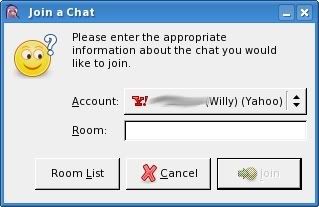
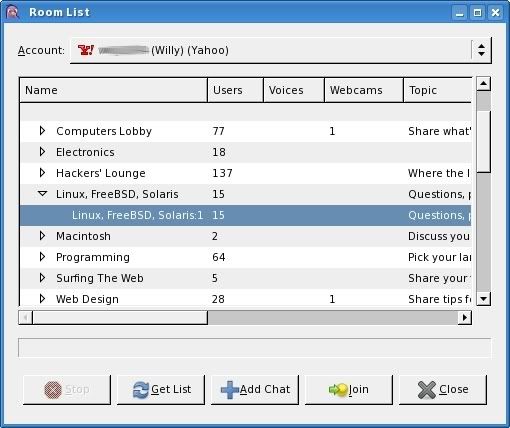
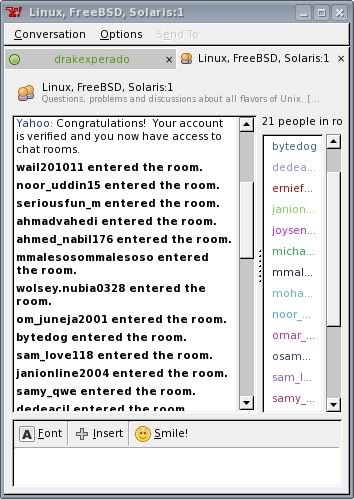
Some people asked about Pidgin capabilities to join a chat room. I never used Chat Room before in YM nor Pidgin. So i tried to do some small testing on my Slackware box. First thing, click on Buddies > Join a Chat on Pidgin's main window. You will be asked what room you are joining (first screenshot). If you are unsure or you don't know what room to join, just click on the Room List and you will lots of rooms there (second screenshot). Just pick one of them and you will see an empty chat room filled with text from Yahoo Chat (third screenshot).
Go to the URL provided and entered the random CAPTCHA text there to prove that you are human
When you have entered the text, your account will be activated and you can start to chat on the room. Unfortunately, this steps will have to be taken each time you entered a room (even the same room in the future). I know it's daunting, but it's true. I don't know why they do this (i'm not sure YM users will have to do this).


Go to the URL provided and entered the random CAPTCHA text there to prove that you are human
When you have entered the text, your account will be activated and you can start to chat on the room. Unfortunately, this steps will have to be taken each time you entered a room (even the same room in the future). I know it's daunting, but it's true. I don't know why they do this (i'm not sure YM users will have to do this).


Monday, May 19, 2008
Escape Shortcut
In Yahoo Messenger, every time you press ESC (escape) keys on your keyboard, it will close the current chat window (not the main application though), very handy for closing unwanted chat session (if you have too many of them in your screen). This feature was not available in Pidgin 2.4.1 and previous version.
Well, that's about to change as in 2.4.2, Pidgin developers has added a shortcut to close the window by using ESC keys. To do that, open Tools > Preferences > Interface. Look at the bottom of the screen and tick the option "Close conversations with Escape key".
Here's the changelog entry:
Well, that's about to change as in 2.4.2, Pidgin developers has added a shortcut to close the window by using ESC keys. To do that, open Tools > Preferences > Interface. Look at the bottom of the screen and tick the option "Close conversations with Escape key".
Here's the changelog entry:
Add a preference to set Escape as the keyboard shortcut for closing the conversation window.By using this shortcut, it's getting more usable and it saves time (not much though).
Sunday, May 11, 2008
Pidgin Status Changer
Lately, i found out that Pidgin have some problems with their status changer. Sometimes, i changed my status and my contact list didn't see my new status. They will see the new status when they logged out and logged in again (but they will not see my new status if i changed it again).
Few days ago, i tried to install MusicTracker and also AmarokPidgin that does the same thing, change my Pidgin status based on the song title i played on amaroK. AmarokPidgin does work on my system, even though a little bit of hacking is required, but the new status won't be visible to other people (only when they sign in again). I don't know whether it's pidgin's bug or not, but i do hope it will be fixed in the newer version of Pidgin with an updated of meanwhile project.
Few days ago, i tried to install MusicTracker and also AmarokPidgin that does the same thing, change my Pidgin status based on the song title i played on amaroK. AmarokPidgin does work on my system, even though a little bit of hacking is required, but the new status won't be visible to other people (only when they sign in again). I don't know whether it's pidgin's bug or not, but i do hope it will be fixed in the newer version of Pidgin with an updated of meanwhile project.
Monday, March 03, 2008
File Transfer in Pidgin
In the past, file transfers are nightmare for Linux users who uses Gaim (the previous name before it changed to pidgin). When somebody wanted to transfer file via Yahoo protocol in Gaim, the recipients that uses Gaim under Linux will crash due to unsupported feature.
With the release of Pidgin 2.4.0, the developer has added supports for Yahoo Messenger 7.0+ file transfer, meaning that you can send/receive files from/to your friends. This morning, i had received an image from one of the Indonesian Linux Forum, saying that he couldn't access the forum (which i have fixed it) and it was transfered successfully when i'm using Pidgin 2.4.0 (i build it myself, since it's not yet included in Slackware-Current).
If you use Pidgin daily, then i guest you should upgrade to 2.4.0 version to get this nice feature.
With the release of Pidgin 2.4.0, the developer has added supports for Yahoo Messenger 7.0+ file transfer, meaning that you can send/receive files from/to your friends. This morning, i had received an image from one of the Indonesian Linux Forum, saying that he couldn't access the forum (which i have fixed it) and it was transfered successfully when i'm using Pidgin 2.4.0 (i build it myself, since it's not yet included in Slackware-Current).
If you use Pidgin daily, then i guest you should upgrade to 2.4.0 version to get this nice feature.
Sunday, March 02, 2008
Nice Feature of Pidgin
Since i'm using Linux all the time lately, it doesn't mean that i'm offline from instant messaging-based communication. I use Pidgin for my daily application for instant messaging as it supports multi protocol (even though i usually login only to YM protocol).
Once nice thing that i like in Pidgin besides the openness of the application is that it's easier to move one person to another group compared to Yahoo Messenger. In YM, you will have to drag the person to the correct group. This is easy to be done, but what if your friends are way too much? You will have to drag it way down below / up too long before you reach the group.
Pidgin offers a nicer way, by offering a menu to move a person from one group to another group. All you need to do is right click the person in the Buddy List and select Move To > and it will show you a list of all groups you have. Just click on the group you wanted and bingo... your contact has been moved to another group. As simple as that.
I believe that Yahoo team can do this and i hope it will be integrated in the next Yahoo Messenger 9
Once nice thing that i like in Pidgin besides the openness of the application is that it's easier to move one person to another group compared to Yahoo Messenger. In YM, you will have to drag the person to the correct group. This is easy to be done, but what if your friends are way too much? You will have to drag it way down below / up too long before you reach the group.
Pidgin offers a nicer way, by offering a menu to move a person from one group to another group. All you need to do is right click the person in the Buddy List and select Move To > and it will show you a list of all groups you have. Just click on the group you wanted and bingo... your contact has been moved to another group. As simple as that.
I believe that Yahoo team can do this and i hope it will be integrated in the next Yahoo Messenger 9
Subscribe to:
Posts (Atom)