Showing posts with label Virtualization. Show all posts

Tuesday, September 16, 2014

Three Exciting Releases

There were three exciting open source releases  yesterday. They are proxmox 3.3, ffmpeg 2.4, and enlightenment 19.

First, let's talk about Proxmox. The new release is a big one and it was announced here. There are several big changes on this release, including:
  • Firewall support (new package pve-firewall)
  • Two-Factor Authentication (Yubico and OATH) 
  • noVNC console  (use HTML5)
  • new Proxmox VE Mobile, GUI for mobile devices 
  • ZFS Storage support
  • Updated to Qemu 2.1.0
  • pve-kernel-2.6.32-32-pve: 2.6.32-136  
  • pve-kernel-3.10.0-4-pve: 3.10.0-17 
  • based on Debian Wheezy 7.6  
Next is ffmpeg 2.4 which was announced here. It was released just 2 months after 2.3 release and it has a codename of "Fresnel". Please note that this release IS NOT ABI-compatible nor fully API-compatible with previous version. But on the other hand it is aligned with the Libav 11 release series, and will as a result probably end up being maintained for a long time. Don't get rush to upgrade if you have lots of applications that depends on earlier API version otherwise it will break.

FFmpeg 2.4 includes the following library versions:
        • libavutil      54.7.100
        • libavcodec     56.1.100
        • libavformat    56.4.101
        • libavdevice    56.0.100
        • libavfilter     5.1.100
        • libswscale      3.0.100
        • libswresample   1.1.100
        • libpostproc    53.0.100

Important API changes since 2.3:
        • The new field mime_type was added to AVProbeData, which can
          cause crashes, if it is not initialized.
        • Some deprecated functions were removed.
        • The avfilter_graph_parse function was made compatible with Libav.
        • The Matroska demuxer now outputs verbatim ASS packets.

Last, but not least, is enlightenment 0.19.0. Mike Blumenkrantz has announced on the mailing list and this release brings huge updates, including:

* greatly improved wayland support
    - E_WL_FORCE environment variable for forcing output types
* e_uuid_store: Add infrastructure to store window/surface properties.
* Add a tiling profile.
* per-screen desklock logo visibility config
* Tiling: Merge the tiling module rework..
* check udisks1 DevicePresentationHide flag
* ACTIVATE_EXCLUDE window active hint policy
* show video resolution in filepreview widget
* add fileman option to clamp video size for video previews
* handle xrandr backlight using a single, accurate handler
* blanking options for wakeup on events (urgent + notify)
* packagekit module for package manager integration
* ibar now optionaly triggers its menu on mouse in
* selective redirection toggling
* new focus option "raise on revert focus"
* add PIN-style desklock for lokker module
* make desklock hookable, break out current desklock into module, move pam stuff to separate file
* revive personal desklock passwords
* allow moveresize visuals to be replaced
* allow desk flip animations to be handled completely externally
* E16-style live pager returns!
* comp config is no longer a module
* E_FIRST_FRAME env variable
* new compositor API
* add E_MODULE_SRC_PATH for setting current module src path without needing to install modules
* use non-recursive makefiles for entire build system

Friday, April 18, 2014

VMWare Workstation 10.0.2 Released

VMWare has released a new maintenance release of VMWare Workstation 10.0.2 which brings in several bug fixes and also new guest support to the newly released Ubuntu Linux 14.04 and also OpenSUSE 13.1 for Linux and also Windows 8.1 Update 1 and Windows Server 2012 R2 for Windows guest.

Here are the list of resolved issues fixed on this release :
  • Better audio performance and compatibility with certain USB audio/video devices.
    The compatibility and performance of USB audio and video devices with virtual machines has been improved.
  • USB devices can be connected to the Linux RHEL 5 guest operating system.
    Resolved an issue that prevents a USB device from being connected to Linux RHEL 5 guest operating system.
  • Windows 8.1 Update 1 and Windows Server 2012 R2 are supported as guest operating system through easy install.
    Easy installation option supports Windows 8.1 Update 1 and Windows Server 2012 R2 as a guest operating system.
  • OpenSUSE 13.1 is officially supported as a host operating system.
    OpenSUSE 13.1 is now supported as a host operating system.
  • Blueray drives can burn CDs when connected to the virtual machine.
    Resolved an issue causing burning CDs with Blueray drives to fail while connected to the virtual machine.
  • Using Microsoft Word and Excel in unity mode no longer produces a beep.
    Resolved an issue that caused using Microsoft Word and Excel in unity mode causes a beep.
  • The UAC dialog of the Windows 8 virtual machine no longer causes the host application windows to be blanked out on Linux Host.
    Resolved an issue causing host application windows to be blanked out in the UAC dialog on the Linux host of the Windows 8 virtual machine.
  • The sound card can be automatically added to a virtual machine on a Linux host at power up.
    Resolved an issue that prevented the Sound Card from being automatically added to the VM when powering on the virtual machine on a Linux host.
  • Windows 8.1 guest operating system no longer display a black screen when launching Metro style applications from the launch menu.
    Resolved an issue that could cause a Windows 8.1 guest operating system to display a black screen when launching Metro style applications in the launch menu.
  • Hotkeys can be used in the Preference dialog in KVM mode.
    Resolved a hotkey conflict in the Preference dialog of the KVM mode.
  • Improved compatibility of GL renderer with new Nvidia drivers.
    Resolved a compatibility issue of GL renderer with some new Nvidia drivers.
  • Improved graphics quality with Solidworks applications.
    Resolved graphics errors with for Solidworks applications.
  • Virtual machines imported from a physical PC no longer crash on startup.
    Resolved an issue causing virtual machines imported from a physical PC to crash on startup.
  • Reading and writing to a file using two threads with a shared folder has been improved.
    Resolved an issue about shared folder when the user read and write file using two threads.
  • Linux virtual machines access updated contents when using shared folders.
    Resolved an issue that caused Linux virtual machines to see stale file contents when using shared folders.
  • Improved performance of the virtual machine using the E1000e adapter.
    Resolved the virtual machine performance issues when using the E1000e adapter.
  • Workstation now launches on Ubuntu 14.04.
    Resolved an issue preventing Workstation from starting on Ubuntu 14.04.
There are also some known problems on this release:
  • VM BIOS show a maximum of 8 disks in Windows 8 host and Windows 8 guest.
    Only 8 disks are shown on the boot page of BIOS.
    Workaround: Remove all the disks greater than 8 from the vm setting and keep the boot disk in the BIOS boot list, then have the boot disk to the top position, then restart the VM. after VM started, add the removed disk back by selecting add existing disk.
 Go get the trial version from this link

Thursday, August 01, 2013

Leason Learned

Last year, i taught network administration course for the first time and i admit there was a some problems during the course since i had a new method of teaching this course compared to previous lecturer. I learned from last year and prepared for the same course this year and this time, i'm fully prepared for the course.

Last year, i gave the students a clean installation of Slackware-Current image for VMWare, but it wasn't a full installation, so on some topics, i had to pause a bit and install the necessary packages before continuing. This time, i will use a clean and full installation of Slackware 14.0 for this course. I really hoped that Slackware 14.1 will come out before this course starts and i can use it, but unfortunately that won't happen for this course. Probably i can ask the students to perform an upgrade to Slackware 14.1 when the course is over :)

This year, i also prepared a special VM of Slackware 14.0 on a public server, thanks to Proxmox which is already installed and fully working. The difference is that this VM will be able to access the Internet, so they can perform a lot of experiments on this machine. I have also prepared a snapshot for this image, so i can roll it back to the original state suppose the students broke the machine.

Thanks to last year's students who gave me a valuable feedback about the course.

Friday, July 26, 2013

Playing With Proxmox

In the last two days, i have been playing with a new toy called Proxmox. It's a Debian-based Linux distribution used to provide virtual environment. I wanted to test this product so that i can use it to help students for their final project when they need additional resources.

So far, i have a fully working Proxmox 3.0 and also i have successfully installed a Slackware64-14.0 as the first VM client and it's working well. I had a problem of configuring it so that the client is able to access the Internet, but it has been sorted few hours ago. I might be able to use this VM client as my new build machine in the future.

It's a free product and easy to use. The default installation will take all of your hard disk, so make sure you have no data inside it, since it doesn't ask for manual or custom partition layout.

Just in case you have trouble, don't forget to check their Wiki page

Friday, May 24, 2013

Proxmox 3.0 Released

For those who have been waiting for new release of Proxmox, here's your prizes: Proxmox 3.0 has been released.

Proxmox VE is a complete open source virtualization management solution for servers. It is based on KVM and container-virtualization and manages virtual machines, storage, virtualized networks, and HA Clustering.

The enterprise-class features and the intuitive web interface are designed to help you increase the use of your existing resources and reduce hardware cost and administrating time - in business as well as home use. You can easily virtualize even the most demanding Linux and Windows application workloads.

Change log:
Released 24.05.2013:
  • pve-kernel-2.6.32 2.6.32-100
  • fix CVE-2013-2094
  • update ceph packages to 0.61.2
  • libpve-common-perl 3.0-4:
  • fix bug #381: use persistent reservation file for ports
  • new function PVE::Tools::next_migrate_port()
  • libpve-storage-perl 3.0-6
  • rbd : clone volume to same pool that base volume
  • extend storage list API with useful parameters for clone
  • fix iscsi session scan bug
  • pve-cluster 3.0-4
  • depend on fuse (seems most utilities moved from fuse-utils to fuse)
  • remove depencency on fuse-utils (this package is no longer required)
  • fix warning about uninitialize value
  • fix bug 383: restart pveproxy instead of apache2
  • pve-manager 3.0-20
  • fix login problem when http_proxy is set
  • updated Chinese, German and French translation
  • allow to upload files with spaces in filename (replace with '_')
  • allow to delete pools with non-existent VMs/Storage
  • use correct icons for templates
  • sort templates after regular VMs
  • StorageSelector: allow to use new target option, used by Clone
  • fix bug #385: correctly handle Accept-Encoding
  • fix bug #374: correctly remove destroyed container from pool
  • pve-qemu-kvm 1.4-12
  • vma create: only store basename of config file.
  • qemu-server 3.0-15
  • clone disk : keep source volume params
  • clone: check is we can clone to target storage
  • fix bug #381: use PVE::Tools::next_migrate_port()
  • restore: do not restore template flag
  • vncterm 1.1-3
  • re-enable javascript-events.patch (needed by migrate)
  • based on Debian 7.0 (Wheezy)
  • new VM clone feature
  • new event driven API server (pveproxy)
  • completely replace apache2
  • efficient support for HTTP keep-alive
  • support bootlogd (boot log can be viewed on the GUI)
  • update pve-qemu-kvm to 1.4.1
  • update kernel to vzkernel-2.6.32-042stab076.7.src.rpm
  • changed default IO Scheduler to 'deadline'
  • updated Intel network drivers for e1000e, igb and ixgbe
  • Countless bug fixes (for all details see bugtracker and GIT

Friday, September 07, 2012

Teaching using Slackware

I teach Network Administration course this year and i'm using Slackware as the base operating system during this course. I build a VMWare image using the latest Slackware 14.0 RC4 as the base and i gave it to my students. Some of them dare to set up a native dual boot even though i never asked them to have a native installation.

Today is the second week, but it's really the first week when i really teach them on how to learn the Slackware environment. So far, everything went well and no big problems except that at the beginning, the progress was kinda slow since we had to transfered 5.6 GB of data (VMWare image) to several laptops. When that was done, everything progressed smoothly.

Firstly, i taught them how to add a new user. It's not safe to use root as your daily user, especially when you are inexperienced user. Next, i taught them some basic understanding about directories in Linux, some basic commands, and some basic configuration. I will continue the course next week by teaching them about permissions, package management, and more basic configuration so that their new environment is comfortable to be used by them.

Thursday, June 21, 2012

VirtualBox 4.1.18 Released

A new maintenance release for VirtualBox has been released. This release brings stability fixes and regression fixes from previous version:
This is a maintenance release. The following items were fixed and/or added:
  • VMM: fixed VERR_REM_VIRTUAL_CPU_ERROR under rare conditions after the guest has been reset (bug #5164 and others)
  • VMM: fixed host freezes with 64-bit guests on 32-bit Linux hosts (bug #10528)
  • VRDP: added a workaround for rdesktop clients not properly updating the screen size when minimized
  • AHCI: fixed a rare bug which can cause a guest memory corruption after the guest storage controler has been reset
  • NAT: another attempt to fix crashes under rare conditions (Windows hosts only; bug #10513)
  • Mac OS X hosts: addressed issues running Leopard / Snow Leopard (bug #10631)
  • Linux hosts / Bridged Networking: fixed the problem with device driver unloading on kernels 3.2.18 and newer due to an invalid reference counter (bug #10624)
  • Linux hosts / guests: Linux 3.5-rc1 fixes
  • Linux Additions: the guest content was sometimes not properly updated (bug #9887)
  • Solaris Additions: installer fix for X.org Server 1.11 and 1.12

Wednesday, May 23, 2012

VirtualBox 4.1.16 Released

Oracle has managed to release a new version of VirtualBox, 4.1.16. As usual, this version comes with a lot of bug fixes and some new additions for better support of XOrg and new Linux Kernel (3.4).

Here's the ChangeLog:
  • VMM: fixed a Guru Meditation VERR_ACCESS_DENIED with certain guests (bugs #7589, #8247)
  • VMM: fixed a Guru Meditation VERR_PAGE_TABLE_NOT_PRESENT with Ubuntu 32-bit guests with nested paging enabled on AMD CPUs (bug #10183)
  • VMM: preserve segment limits and attributes when switching to unreal mode required for some legacy guests to work properly (VT-x without unrestricted guest execution only; bug #9941)
  • VMM: fixed a VM hang after a resume from pause / savestate with SMP guests in rare cases
  • 3D Support: several fixes for the Windows WDDM video driver crash
  • NAT: fixed a crash on attempt to process ICMP datagram under some circumstances (bug #10527)
  • Host-only Networking: lifted the maximal number of interfaces to 128 on Linux and Mac OS X hosts (there is no such limitation for Solaris and Windows hosts)
  • EFI: fixed wrong SEC/PEI Core entry point calculation (bug #10531)
  • VRDP: fixed a display update problem (bug #10503)
  • Main: set the proper VM state if savestate failed for some reason (bug #6189)
  • Main: more useful error message if a medium is inaccessible
  • VBoxManage: fixed controlvm savestate if the VM is already paused
  • Mac OS X hosts: addressed issues running on Mountain Lion Preview 3 (bug #10267)
  • Linux hosts: Linux 3.4 compile fixes
  • Linux hosts: fixed wrong help path in some rpm-based packages (bug #10418)
  • Guest Additions: fixed handling of custom environment variables during VBoxManage guestcontrol execute (bug #10581)
  • Windows Additions: fixed guest driver crash of VBoxSF in certain cases (4.1.10 regression, bug #10408)
  • Windows Additions: don't load the WDDM driver if 3D support is not available for Windows 8 guests to keep the guest maintainable in that case (still better to miss some features than providing a blank screen)
  • Solaris Additions: added support for X.org Server 1.11 and 1.12

Monday, November 21, 2011

VMWare Workstation 8.0.1 Update

VMWare Workstation 8.0.1 is now released to provide maintenance for the previos 8.0. One of the most important for most people is the addition of Ubuntu Linux 11.10 as the supported guest operating system and also bug fixes along with memory management improvements.

Highlights of VMware Workstation 8.0.1 functionality include:
  • Graphics performance and compatibility enhancements.
  • Improvements in creating and using shared virtual machines and remote virtual machines.
  • Ubuntu 11.10 is officially supported as a guest operating system.
  • Disk and memory management issues have been addressed.
  • Many customer-reported issues have been resolved.
The following sections list the resolved issues in VMware Workstation 8.0.1.
  • Windows 7 guest installation failed after powering on the virtual machine with the error A required CD/DVD drive device driver is missing. If you have a driver floppy disk, CD, DVD, or USB flash drive, please insert it now.
  • VMware Tools failed with the message VMware Tools unrecoverable error.
  • VMware Tools failed to start in Fedora 15 guests.
  • An Ubuntu 11.10 guest crashed with a signal 11 error if you installed or upgraded VMware Tools.
  • On hosts with Nvidia GeForce and Quadro video cards, some of the clouds in the Unigine Heaven Benchmark application were drawn solid black.
  • Easy Install did not properly function on Ubuntu 11.10.
  • If remote virtual machines were open, you could not shut down the Windows hosts.
  • When transitioning from Full Screen mode to Exclusive mode, the Full Screen toolbar sometimes failed to hide.
  • Host memory reservation restrictions on Windows hosts are more relaxed in VMware Workstation 8.0.1 than in previous versions of VMware Workstation.
  • CD/DVD mount Linux.iso failed while installing VMware Tools in Ubuntu 11.10 guests.
  • The AltGr key was not working in an Ubuntu guest in Unity mode when the host and guest keyboards were both set to a layout that contained the AltGr key.
According to Release Notes of VMWare 8.0.1, this is a free update for 8.0 users, so just go and download the latest update Goodluck

Friday, September 16, 2011

VMWare Workstation 8

For those who played in virtualization world, you might be happy to hear this : VMWare Workstation 8 is now released to bring new interesting features such as:
  • Remote Connections – VMware Workstation 8 provides a seamless way to establish remote connections to hosts running in Workstation, VMware vSphere, and VMware vCenter™.
  • "Share" VMs – New in Workstation 8, users can share VMs so they can be accessed by teammates providing a quick way to test applications in a more production-like environment.
  • Upload to vSphere –Workstation 8 enables users to drag and drop a VM from a user's desktop to VMware vSphere. This feature allows users to deploy a complete application environment from a PC to a server for further testing, demoing, and analysis.
  • New User Interface –The VMware Workstation 8 user interface has been revamped with simplified menus, live thumbnails, improved preferences screens, and a new virtual machine library with enhanced searching. Users can now search and access a large library of virtual machines that can reside on your desktop, a server, or on another PC running VMware Workstation.
  • Improved Virtual Machine Capabilities – With support for HD audio with 7.1 surround sound, USB 3 and Bluetooth devices, Workstation 8 delivers new levels of virtual machine performance. In addition, improvements to virtual SMP, 3D graphics performance and new support for 64-GB RAM allows users to run the most demanding applications in a virtual machine.
If you are part of an education institution, you might as well sign up for VMWare Academic Program to get a long term support and also a discounted price for some of VMWare's product:

Wednesday, July 20, 2011

VirtualBox 4.1 Released

After having several quick Beta release, VirtualBox 4.1 is now officially released by Oracle team in Germany. This is a major upgrade, so new features are introduced along with other bug fixes mentioned on the changelog:

This version is a major update. The following major new features were added:
  • Support for cloning of VMs (bug #5853, see the manual for more information): full clones can be created through the GUI and VBoxManage, linked clones only through VBoxManage
  • GUI: enhanced wizard for creating new virtual disks
  • GUI: new wizard for copying virtual disks
  • GUI: keep the aspect ratio in scale mode (Windows and OSX hosts only; bug #7822)
  • VMM: raised the memory limit for 64-bit hosts to 1TB
  • Experimental support for PCI passthrough for Linux hosts, see the manual for more information
  • Windows guests: Experimental WDDM graphics driver, supporting Windows Aero (bug #4607) and providing Direct3D support using a cleaner approach (no need to install the guest drivers in Safe Mode anymore)
  • Guest Additions: status of modules and features can now be queried separately by the frontends
  • Networking: new network attachment mode "Generic Driver", which offers an open plugin architecture for arbitrary and separately distributable virtual network implementations
  • Host-only Networking: fixed host crash in kernels prior to 2.6.29
  • New Networking Mode UDP Tunnel: allows to interconnect VMs running on different hosts easily and transparently, see the manual for more information
  • Experimental support for SATA hard disk hotplugging available with VBoxManage
  • Solaris hosts: New Crossbow based bridged networking driver for Solaris 11 build 159 and above

In addition, the following items were fixed and/or added:

  • VMM: more SMP timer fixes
  • VMM: fixed sporadic recompiler crashes with SMP guests
  • VMM: many small fixes
  • GUI: when reverting to a snapshot, ask for taking a snapshot of the current state
  • GUI: added a View menu
  • GUI: added a setting for the promiscuous mode policy for internal networks, bridged networks and host-only networks
  • GUI: added slider for setting the CPU execution cap allowing to limit the amount of CPU time spent for the execution of the guest, see the manual for more information.
  • GUI: the VM description is editable during the runtime of a VM (bug #1551)
  • GUI: added proxy settings (bug #2870)
  • GUI: made the number of SATA ports configurable
  • GUI: decrease time before showing the VM configuration dialog
  • VBoxManage: more convenient configuration of storage controller attachments by automatically determining the port or device parameter when a storage controller has only one port or device per port
  • VBoxManage: changed syntax of the guestcontrol command group, fixed various bugs, removed obsolete options
  • VBoxBalloonCtrl: new service for automatic dynamic adjustment of the balloon size for running VMs
  • Settings: machine names and snapshot names are not allowed to be a valid UUID
  • Settings: provide better diagnostics if a single medium is used twice in a VM configuration
  • Settings: provide better diagnostics for errors in medium create/merge/clone operations, and fix memory leaks in error cases
  • Storage: ATA/SATA drives can be marked as non-rotational, i.e. the guest OS will detect them as a SSD if supported, which can improve performance
  • Storage: virtual CD/DVD images will be detached if the guest ejects the medium, unless the drive is marked to handle ejects only on a temporary basis
  • Storage: the medium UUID can be changed again when attaching a medium for the first time, which allows using images which are exact duplicates including the UUID
  • Storage: fixed possible data corruption under certain circumstances with VHD and Parallels images (bug #9150)
  • Storage: fixed unnecessary expansion when cloning differential images in VDI format
  • Storage: fixed detection code to handle empty files for VDI and VMDK format
  • Storage: fixed access to CD/DVD images beyond 4GB when using the SATA controller (bug #8592)
  • Floppy: several bugs have been fixed
  • Floppy: make it possible to unmount a host floppy disk (bug #6651)
  • BIOS: disk-related structures are now checksummed correctly (bug #8739)
  • USB: many fixes for the Windows USB host driver
  • NAT: reduced memory footprint
  • Networking: fixed the problem with segmentation offloading when several VMs are transmitting in parallel
  • Networking: workaround for a bug in wireshark when operating directly on a capture file created by VirtualBox
  • Serial: announce the serial devices in the ACPI tables to make Windows guests find the virtual hardware (bug #7411)
  • VRDP: support for TLS connections (see the manual for more information)
  • VRDP: support for multimonitor client configurations with MS RDP clients
  • VRDP: fixed a rare screen corruption
  • 3D support: fixed GL_VERSION string for different locales (bug #8916)
  • Webservice: fixed timeout handling with HTTP 1.1 keepalive, and be more robust when connections fail
  • VBoxSVC: fixed regression when several clients trigger autostart simultaneously
  • Main: fixed incorrect handling of the medium location for media which are not file based (e.g. iSCSI), which resulted in confusing location values in many places
  • JAX-WS client bindings: fixed resource leak
  • Sources: fixed USB 2.0 support using extension packs for non-official builds
  • Mac OS X hosts: fixed non-VT-x mode on Lion hosts
  • Windows hosts: fixed copy'n'paste in the GUI and for the VM window (bug #4491)
  • Windows hosts (64-bit only): enabled removing of all mediums when removing a VM
  • Windows hosts (64-bit only): enabled live snapshot deletion
  • Windows hosts: use native controls in the installer (bug #5520)
  • Solaris hosts: fixed preemption issue with Solaris 11 hosts (builds 166 and above)
  • Solaris hosts: better control of USB device access on Solaris 11 hosts
  • Guest Additions: improved driver installation on Windows guests
  • Guest Additions: fixed high CPU usage while executing guest programs from the host
  • Solaris Additions: fixed automounting of shared folders (bug #8014)

Tuesday, May 17, 2011

Second Virtual Server

I built a virtual server on top of VirtualBox last year with some hope that the students can take advantage of it if they need a LAMP server for a spesific subject related to web development. I didn't really think about it because at first, i only wanted to try the headless installation article that i saw on one of ID-Slackware's member blog post. The server was up and running up to now and it has been used on several course, including for final project as well.

Since Slackware 13.37 has been released, i wanted to build another virtual server using the new Slackware 13.37, so this morning, i decided to make a new one. It's up and running now and it has almost the exact configuration as the first one, except that i make it more up to date for the applications and libraries installed on it.I also allocate more space on it, so that it could be occupied by more and more students project.

One note about this new installation is that it's the first time i used XFS as the default filesystem for all of the partition (except for swap). I heard a lot of article and benchmarking said that XFS is a nice FS for server, so i wanted to try this one, so i used it as the default. For now, i can't see the results yet, as there are no projects or loads, but there will be soon enough.

If you are curious about the server, you can take a look the spec here.

Saturday, February 05, 2011

Building New Virtual Server

Few weeks ago, i built a new virtual server on top of one of my server in my campus. It was built using Slackware 13.1 on top of VirtualBox 4.0.2. So far, the performance is good and i have no problem with it.

Last Friday, we discussed about further usage of virtual server to support our education process. We can use the virtual server to host student's work or final project so that they can try it out without having to buy new hosting or domain and use internal resources.

I decided that we will go on with the idea, but i will wait until Slackware 13.2 is released before i start the new virtual server which should have better and optimized configuration compared to the first one. I actually built it for testing purposes, but it went well, so i used it for my class Sky

For the next configuration, i have prepared some adjustment to make it more robust, configurable, efficient, and should be more up to date compared with the current one.

Wednesday, January 12, 2011

Working With Headless Virtual Machine

Yesterday, i was trying to learn new thing: configuring a headless virtual machine. I need this one as i will teach Internet Application Engineering this semester and i'm hoping to provide a hosting site for the students to upload their work, but i don't want to risk the available systems, so i decided to try on building a virtual machine on top of the current system.

I'm used to VMWare, but i don't know if VMWare does offer headless virtualization, so i tried to use Virtual Box from Oracle. It took me a while to learn about all the command line options, but finally i managed to build the machine using Slackware 13.1 and configure it's services. I basically only need small number of services, which are HTTP, Database (MySQL), and SCP/SSH. I don't use FTP, since it's not secure and i want to make sure that all data transfer happened in secure channel.

For now, it has been working well, and i'm still configuring several things, including the possibility of having SVN or any other SCM tools (they are already installed actually, but i will try to provide web-svn access for the students). Not bad for something new and being worked under 24 hours Evil Grin

Tuesday, June 29, 2010

Expanding Disk on VMWare

In the past, whenever i created an image for Windows in VMWare, i set the space so that it would be sufficient for my need and in most cases, it didn't since i need to install more and more application for my CEH classes (security never stopped evolving).

With VMware Workstation 7 and newer, it has supported expand feature in which you can expand the disk capacity from the VMware GUI and avoid using command line anymore. It's much simpler, but it requires two steps.

Expand Your Virtual Disk Setting
Select the image, and click Edit virtual machine settings. Select the Hard drive and click on the Utilities button on the bottom of the screen. There will be four options there: Mount Disk, Defragment, Expand, and Compact. I'm sure you know what to pick right? big grin Go ahead and set the maximum disk size that you like. Click expand when you are done and the VMware will expand it in no time. It would take a few seconds to expand it.

Are we done yet? YES, for the first part, but remember, this only expand the virtual hard drive, but not the real hard drive in your Windows image. What the operation does is adding an unallocated disk space on your Windows hard drive so that you can use it later on.

For example, your current disk space is 10 GB and you expand it up to 50 GB, that means you will have around 40 GB in a new unallocated disk space. What can you do with it? You can create separate partition or you can resize your current disk space to use the unallocated disk space and you will get more free space.

Resizing disk space in Windows
The second operation should be done in the guest operating system itself. If you want to create a new partition, you don't need to use third party tool. You can use Disk Management from Windows to create a new partition from the unallocated disk space. Type diskmgmt.msc in the Start->Run command box and pick the unallocated disk. Right click and pick Create New Partition. That should work just fine.

When you want to resize your current disk space to use the unallocated disk space, the internal Disk Management utilities is not the correct tool. It can't resize the partition, so you will need a third party application to help you. I would suggest Norton Partition Magic to do that. It's by far the best partition manager application i have ever tried. With only quite a simple click, i'm able to resize my partition and in no time, i already got a lot of empty spaces on my Windows image under VMware Yahoo

Now, i don't have to create another Windows image when i need more space. All i need is to expand the disk and i can enjoy more empty spaces to work with. VMware does really a good job on providing this handful feature Applause

Friday, September 26, 2008

VMware Server 2.0

VMware has released major upgrade for VMware Server which is now reached 2.0. There has been numerous changes to this release, including:
  • VI Web Access: VI Web Access enables you to perform host and virtual machine configuration on VMware Server 2.0. This intuitive web-based interface provides a simple and flexible tool for virtual machine management.
  • VMware Remote Console: VMware Remote Console enables you to interact with the guest operating system on the host or a remote system. After you install it as a Web browser add-on, it can run independently from VI Web Access. VMware Remote Console also allows you to connect and disconnect client CD/DVD and floppy devices.
  • USB 2.0 Device Support: VMware Server now supports faster data transfer with USB devices plugged into the host system. If the guest operating system has appropriate USB 2.0 device drivers, you can use peripherals that require high-speed performance, such as speakers, webcams, next-generation printers and scanners, and fast storage devices.
  • Increased RAM support: The maximum amount of memory that can be allocated per virtual machine has been raised from 3.6GB to 8GB. The amount of memory used by all virtual machines combined is limited only by the amount of the host computer's RAM.
  • Improved 64-bit guest support: 64-bit guest operating systems that run on Intel EM64T VT-capable or AMD64 revision D or later processors are fully supported.
  • Native 64-bit host support on Linux: VMware Server now runs natively on 64-bit Linux host operating systems.
  • Quiesced backups of virtual machines: On Windows hosts, you can enable the VMware VSS Writer, which uses snapshots to maintain the data integrity of applications running inside the virtual machine when you take backups.
  • VMCI Sockets interface: This feature provides a sockets interface for the Virtual Machine Communication Interface, which provides a faster means of communication among applications running on the host and in virtual machines. For more information, see the VMCI Sockets Programming Guide.
  • Hot add and remove for SCSI hard disks: You can now add and remove SCSI virtual hard disks while the virtual machine is running in hardware version 7 virtual machines.
Beware, the filesize is HUGE!!!! (almost 600 MB). Go get them now

Sunday, October 21, 2007

Replacing Feisty With Gutsy

Few days ago, i have finished downloading the latest Ubuntu and Kubuntu distribution, 7.04 (aka Gutsy Gibbon). Previously, i have Feisty installed on my Windows XP, using VMWare (i don't replace my Slackware and i reserved my Linux partition only for Slackware). So yesterday, i removed my Feisty virtual machine and i installed Kubuntu (i'm trying new things here, since i previously installed Ubuntu). The installation process hasn't changed much since last version. It consist of 6 steps (reduced from 7 in Feisty) and it's very straightforward. I don't know much about package selection, since Kubuntu ships different application than Ubuntu. But my first impression when Kubuntu started is very minimalistic. The application is very limited (perhaps the developers only choose the most used application and leave the rest in the repository to save some spaces).

Firefox is not shipped by default in Kubuntu (they do shipped in Ubuntu), so in order to use it, i have to install it using apt-get, but that's when the problem arose. Since i'm using Indonesian time zone, the installer create a sources.list file that contains a link to Indonesian site, such as http://id.archive.ubuntu.com. The problem with is that sometimes, Indonesian sites are inaccessible, so i couldn't get anything when i ran apt-get update. The solution is to change the id into us and re-ran the command and voila..... everything works like charm. I can install Firefox again big grin

The default resolution that was picked during installation was so high. It was about 1600x1200 if i'm not mistaken. I choose to reduce it to normal resolution, 1024x768 using KDE Control Center. If i don't do this, i won't be able to have full screen mode.

As usual, Ubuntu never shipped codecs, so people will have to download some package from the repositories when they want to listen to musics or songs or videos. Lucky me, Slackware by default shipped this application, so i can start listening to mp3 files out-of-the-box.

Wednesday, September 12, 2007

VMware Tools Is Now Open Source Application

VMWare has released a new open source application, called Open Virtual Machine Tools (open-vm-tools) to public and it's an open source application. It will enable Linux vendors to integrate VMWare tools into their products (operating system).

FYI, VMware Tools is a set of guest operating system virtualization components that enhance performance and improve management of VMware virtual machines.

For now, it's only for Linux users, but when demands rise up, they will consider to release Windows version.

Saturday, July 28, 2007

Virtualization

Finally i had a chance to try on Virtualization. I have been interested on installing an operating system on top of other operating system and it will be done by using virtualization. Since my laptop is out of space to do that, i will have to do it on my desktop. So i started to download VMWare products and give it a try. I was confused at the beginning, as there are several products for virtualization area (Player, Converter, Server). My colleague told me that he had used Player in his laptop and it worked, so i tried to download this application first. I installed on my XP machine and i tried, but it seems that this application should be used when i already have a virtual machine, so i guess it's not the right application for me.

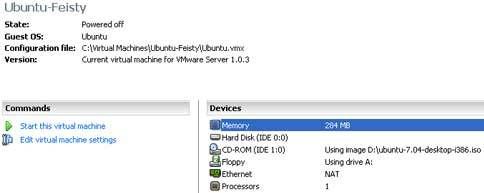
Next, i tried the server and still confused. So i tried to load VMWare Server Console and look for something there and hey... i found what i need. I should create a virtual machine there and prepare everything before i install a guest operating system (i'm trying to install Ubuntu Linux on my system, because i need it for my work). I set 3 GB for it and luckily it's sufficient (it consumes about 2,3 GB for the installation, and ended up with 700MB of free space). Since i have 512 MB of RAM, it's recommended to have 256 MB or RAM for the guest (don't forget about your host machine) and maximum of 284, so i choose 284 MB for it.

Next step is installing Ubuntu. At the beginning, it won't install, as it couldn't find any bootable CD or image on floppy. That's strange, as i have inserted my Ubuntu CD (which i downloaded this morning) and it's already bootable. So i tried to change the parameter to reference my CDROM to the ISO directly and yes, it will work big grin

Installation process runs as usual, and after that, i can have my Ubuntu Linux on top of my XP machine (even though it's quite slow since i only allocate 284 MB for it. The ideal memory is 512 MB or above). It's running well, except for the soundcard which isn't detected (i'm using onboard card), but it's not a big deal, so i just leave it like that. What's nice is that it can connect to the Internet directly via my physic ethernet card, since i set it to use direct NAT.

Virtual Feisty By VMWare