Showing posts with label iOS. Show all posts

Monday, February 03, 2014

Libreoffice 4.2 and Impress Remote

Last week, The Document Foundation has released a new major version of LibreOffice suite 4.2, bringing many many changes to the product, ranging from new UI for the start screen (not the splash screen), new formulas in Calc, better performance, removed old and deprecated APIs, and many more. Along with this release, a new tool was introduced and that is Impress Remote for iOS. The Android version has been introduced since 4.1, but for iOS version wasn't available at that time.

This morning, i checked Apple AppStore and saw that the app has been approved by Apple and now available in their store. I downloaded it on my iPad and start testing it. You can find the online documentation by following this page : http://hub.libreoffice.org/iosremote or use the step by step tutorial on the app itself.

The easiest way to connect is by using the same WIFi network on both devices. Start impress and select Slide Show > Impress Remote. Next start your Impress Remote and start searching for your computer (i tested on my desktop). Try to pair and enter the number showed on your computer on your device and you are now connected. You can start give your presentations using your iPad or iPhone or iPod Touch.

Here's an example of it's UI:

Tuesday, September 24, 2013

Free Alternatives from Google and Apple

Apple has decided to give iWorks which consists of Pages, Numbers, Keynote, iMovie, and iPhotos for free to all customers who bought their new iDevices, particularly iPhone 5S/C that are preloaded with iOS7, their latest mobile operating system. Shortly after that, Google released QuickOffice, which was acquired last year for free as well. This is surely a good news for all users who used these products.

QuickOffice was once a commercial product, $14.99 for Quickoffice on iPhones or Android smartphones, and $19.99 for a version for Android or iOS tablets. That really costly, but worry not, since it's now FREE!!

This really gives Microsoft a pressure since other vendords has started to give their office suite for free. Google did more than that actually, by adding QuickOffice into Chrome OS and also to Google Chrome browser few months ago.

I have upgraded my iPad 3 to iOS 7 and i'm really glad that Google provided this wonderful application for free. I loved this application, except for one missing feature: WiFI upload. It's really a nice feature and it really helped me since i don't use Windows so often. With this feature, i can upload any files i want anytime even though i'm using Linux. This feature is now missing on Google's version of QuickOffice.

Other feature that is missing is to add third party service. Google now limit it onto to their Google Drive service. I don't really use this feature as i already have DropBox on my iPad, but still it's quite annoying to see some features are removed in the latest version.

Saturday, September 21, 2013

BBM for iPhone Officially Launched

BlackBerry has officially launched BBM (BlackBerry Messenger) in other platform than BlackBerry itself which is in iOS. For Indonesian people, you can start downloading BBM for iPhone from this link. It's targetting for iPhone and not applicable to iPod and iPad.

As for the Android platform, it hasn't been released yet, but probably shortly and don't try to download scam applications which tried to trick you. Just relax and wait for the official announcement and link to the Google Play.

Friday, August 23, 2013

iWork for Free

You might be happy to see the title, but don't get over excited first. Read the whole news and see if you are happy with it or not.

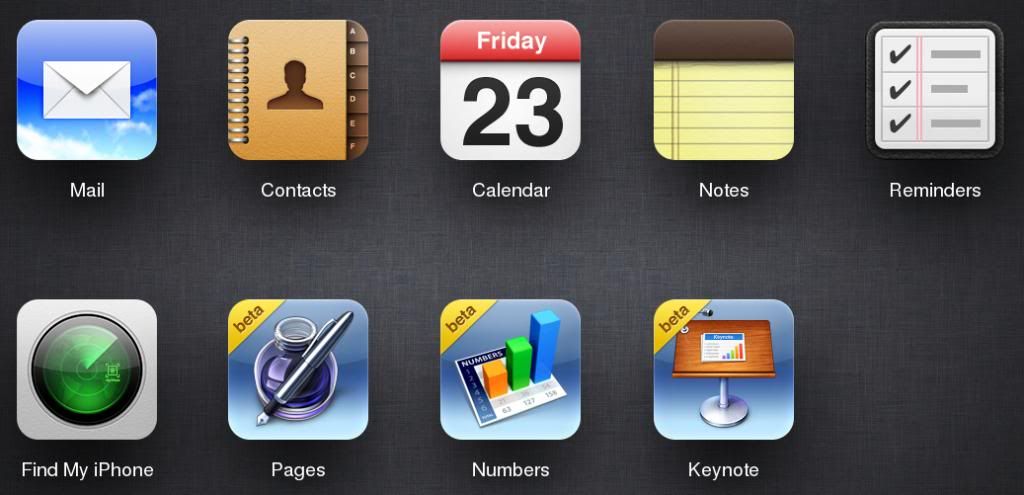
So, Apple is now testing iWork (Pages, Numbers, and Keynote) as a cloud service and place them on iCloud.com (their cloud service along with other apps that are available on most of their iDevices, such as Notes, Reminder, Calendar, Contact, etc). This means, you don't really need to install separate iWork applications (worth US$ 9.99 each) from App Store and just use Chrome or Safari to access icloud.com and have them available on your iDevice.

It's still in Beta phase and we are not sure whether it will be free or not, but for this beta, it's free for use. For best experience, it's recommended to use Safari, since when i used the latest Firefox on Linux, it showed a message that my browser is not fully supported when trying the Keynote. I couldn't see the slideshow when i click on the Play button as well. I guess only Pages works well with Firefox currently.

Taken from Apple's Knowledge Base:
The following browsers are supported for use with iWork for iCloud beta:
  • Safari 6.0.3 or later (OS X)
  • Internet Explorer 9.0.8 or later (Windows)
  • Google Chrome 27.0.1 or later
iWork for iCloud beta will allow you to use these browsers, but some features may not work as expected:
  • Safari 5.0 - 6.0.2 (OS X)
  • Firefox 9.0 and later
  • Google Chrome 7.0 - 26.0.1
Other web browsers may not work with iWork for iCloud beta.

Here's the screenshot of the main page of iCloud after logging in:


Tuesday, May 07, 2013

New Editor and Image Upload Support in Blogger iOS App

Blogger has just updated their iOS application to support new WYSIWYG editor and also support for image upload through the editor. This is something that i have been waiting for since up to yesterday, there are no way to upload images using the native apps in iOS. The only way is to use the web version.

Thanks to Google for updating the apps and implementing this feature in iOS :)

Tuesday, February 26, 2013

evasi0n No Longer Works for iOS 6.1.3

After analysing iOS 6.1.3 Beta 2, David Wang aka PlanetBeing, one of the core members of the Evad3rs who provided untethered jailbreak for iOS 6.x devices said that it has fixed one (and probably more) vulnerabilities used in evasi0n tool.

He is still analysing whether more vulnerabilities are fixed in the latest beta and it's not impossible for Apple to release another beta which will fix more vulnerabilities in the future.

For the time being, stay away from iOS 6.1.3 if you want to keep your device untethered jailbroken using evasi0n.

Saturday, February 09, 2013

Snappier iDevice on iOS 6.1

After jailbreaking my iPad 3rd Gen, i feel that my iPad is now more snappier than before i upgraded to iOS 6.1 (previously 5.1.1). I think because during upgrade process, it kinda format all of the system and install the new firmware to the device and restore all the apps to the device again.

The same goes with most Windows installation system. When you think your system is getting slower, that might be a sympthoms to reinstall your system to be refreshed again. Doing so will clean the registry which holds most of your system and application's settings, including the one you probably have removed.

Back to the iOS case, some people reported that upgrading to iOS 6.1 will increase their battery life on iPhone 5. I don't perform any benchmark on my iPad, so i couldn't tell whether it's happening or not, but what i can tell that iOS 6.1 is causing my iDevices to be more snappier than before.

Thursday, February 07, 2013

My iPad Jailbroken

I decided to try upgrading to iOS 6.1 after backing up my iPad using iTunes on Windows. At the first attempt, the upgrade failed and it stucked on recovery mode and i have to restart the process again. The second time attempt worked.

Since it was about time i go to my office, i decided to perform the jailbreak later when i got home at the evening. My iPad was still running pure iOS 6.1 at that point. So far so good, all of my data is recovered using the backup earlier.

At night, i performed the jailbreak using Evasi0n from Evad3rs team and it's so simple as usual. It will close iTunes and then performing the jailbreak once we click on the button. It requires only several manual steps performed by the users and it's so simple. All you have to do is read the instructions on the Evasi0n tool.

After completing the jailbreak process, it will reboot several times to upload Cydia and the repository as well and you are done. You just need to click on the Cydia and it will perform an initial process of preparing the filesystem for Cydia and then you can start installing applications from Cydia repository.

Big thanks to Evad3rs team who have done another great release on bringing untethered jailbreak to iDevices for iOS 6.x :)

Tuesday, February 05, 2013

Untethered Jailbreak iOS6 is Here

Just few hours since my last post regarding the jailbreak from the evasi0n, they released the jailbreak officially in three different platform, Linux, Windows, and Mac. You can download the tool and connect your devices and click on the jailbreak button to start the jailbreak process.

Basically the process is straightforward, except that there's one last step that must be performed ONLY ONCE, which is to click on the JAILBREAK icon and the screen would flick and it will reboot again. The jailbreak will also install cydia and push the latest update of the repository, so users will no longer have to fetch the repository again after installing Cydia.

Monday, February 04, 2013

Untethered Jailbreak for iOS6 is Coming

Evasi0n progress is now at 98%, meaning that the long-awaited untethered jailbreak is coming up shortly. It should be happening this week as the progress is that close to completion.

Anyway, i'm not quite interested to perform an upgrade to iOS6 since it doesn't add too much interesting feature which benefits me IMHO. iOS 5.1.1 so far has been fantastic and it's working for me. But it will probably change later on when my curiosity is raising up again.

If the release is in reality, it would be a big release from the evad3rs team who have been working hard to make this release possible. It's been a long time since untethered jailbreak is able to win against Apple security protection in their iOS 6.

Tuesday, January 29, 2013

iOS 6.1 Released

After releasing iOS 6.1 Beta 5 few days ago, Apple gave a surprise by launching the final version of iOS 6.1 to public. What's new on this new release? Well, not much and not too interesting, but here they are:
  • LTE support for more carriers (complete list of supported carriers at www.apple.com/iphone/LTE)
  • Purchase movie tickets through Fandango with Siri (USA only)
  • iTunes Match subscribers can now download individual songs from iCloud
  • New button to reset the Advertising Identifier
  • Bluetooth keyboard compatibility to the Apple TV
  • new Map APIs for better app integration
Go get the firmware on this download page

On the good side, an untethered jailbreak might be coming after this release as the JB masters has confirmed that they have found a working exploit and right now, they are reviewing this release with the exploits they have found. If it's proven to be working, they will start updating their tools to perform the jailbreak process in user-side.

Monday, December 17, 2012

Monster Life Completed

Few days ago i downloaded the updated Monster Life and today, i have completed the new Circus campaign, thanks to the unfixed glitch on the app itself. The bug itself is hard to fix IMHO due to the nature of the game flow. It does give a side effect for me, but that's easy to solve and it's not a big deal for me as i can leave that side effect.

I must admit that Monster Life is so addicting game, so if you wish to play it, you will spend most of your time on this game.

Tuesday, November 13, 2012

BlackBerry OS 10?

Some people believed that BlackBerry OS 10 will die prematurely due to long delays and lack of innovation from RIM's developers. Well, in my opinion, this could happen in reality, since RIM is now planning to release BlackBerry OS 10 next January, while Android and iOS are moving ahead with their development.

I think RIM must work on something amazing to keep up with other vendors who deliver something out of the box, not just depending on one technology only (such as BBM in RIM's case). BBM is no longer a powerful concept since many other service are available and can replace BBM, such as iMessage and WhatsApp.

If they don't react fast and do something during this year, i believe they will have a much heavier challenge next year where Android and iOS will keep dominating the phone market.

Thursday, September 20, 2012

iOS 6 Closed Many Vulnerabilities

With iOS 6, Apple want to fight back against the jailbreakers. It's reported that iOS 6 has closed numerous security vulnerabilities found on previous version. Among these fixed vulnerabilities, there might be some vulnerabilities used by the jailbreakers to exploit iOS and able to bypass it's system to deploy the jailbreak.

Jailbreakers has said to stay away from iOS 6 unless you know the risk. While some has reported that a tethered jailbreak has already being done in iOS 6, most people will definitely wait for untethered jailbreak and that will not come in short time.

We will have to wait until the official announcement from the jailbreakears :)

Saturday, September 08, 2012

Database Designer for iOS

I'm involved in quite a complex project right now and i'm responsible for the system architecture and DB design as i'm the project leader for this project. Sometimes, when i'm not in front of the PC, i wanted to work, at least designing the database using my iPad.

I searched through Google and found a product that might be perfect for me: MySQL Mobile Database Client by Impathic. Here's some description and it's feature copied from the original page in App Store:
Browse, search, and update all your MySQL databases on the go with the DataGlass Mobile Database Client for MySQL! DataGlass is your one stop for complete and flexible access to your MySQL servers. From DBAs and IT professionals that need to run ad-hoc queries, to executives who need immediate access to the raw data, to analysts who need to build and execute sophisticated reports, DataGlass is the only app you will need to connect you directly to your data. Whether you are accessing your servers from your local network, or remotely through your organization's secure VPN, you never need to be without the information that is the lifeblood of the modern enterprise. DataGlass requires no complicated desktop servers or expensive middleware to set up: the speed and flexibility of direct connections to your server provides unparallelled efficiency.

• Compatible with MySQL versions 3, 4, and 5
• An unlimited number of databases can be simultaneously managed by DataGlass
• Connect directly to your databases without the need for complex and expensive middleware
• Corporate databases can be accessed remotely using a VPN or by using the built-in SSH tunneling
• Can access tables and views in OLTP databases and data warehouses alike
• Export your raw data to Numbers, Mail, or CSV files for inclusion in external reports
• Save local snapshots of your data for browsing offline or on the road
• Generate elegant charts from your data within the app
• Print the results of your queries directly from your printer-enabled iOS device
• Build and execute sophisticated queries spanning multiple tables using the innovative Query Designer, or enter custom SQL
I think it's a good product. I will have a look on it shortly

Tuesday, June 12, 2012

WWDC 2012 Results

It seems that most of the speculations about what will be presented in WWDC were true. There are iOS 6 Beta releases for developers and sadly there's no iPad 1 support for this version, new Mac Book Pro with Retina display which is awesome, but comes with high prices as well, New 3D Maps, Facebook Integration, Much Improved Siri and it's coming on the new iPad, and the announcement of OS X Mountain Lion release schedule on July and pricing which is set to this Summer and it will be USD 19.99, 10 bucks lower than previous OS X Lion release last year.

But, it's not Apple if they don't bring new and exciting features that are not yet speculated by a lot of people, such as Passbook, FaceTime over cellular, New Calling Feature on iPhone, better Email interface, iCloud Tab on Safari, and iOS 6 Guided Access on Accessibility.

I really like the new specs for the new Mac Book Pro. They have integrated most of the bleeding edge components for their latest product and i believe that Apple can use this baseline for the next three years or probably more. It's now based on i5/i7 Intel Processors, 4/8 GB and up to 16 GB of memory for the Mac Book Pro with Retina Display, All Flash-based architecture for storage, starting from 512 GB up to 768 GB and optionally 1 TB of classic HD, Intel Graphics 4000 or NVidia GeForce GT 650 with Kepler Technology, MagSafe power port, USB 3 ports, HDMI, and many others. They even managed to compact the size of the casing. It's trully amazing.

Monday, June 11, 2012

No iPad 1 on iOS 6?

There has been a speculation about the future of iPad 1 on iOS 6. It's said that Apple will left iPad 1on current iOS and will not let iPad 1 upgradeable to iOS 6 according to the beta build leaks on Chinese forum. Even though it's not yet confirmed, it's a pity (if it's true) to leave iPad 1  because basically the big difference with other iPad products is not that much.

I think the hardware is the biggest difference and that's why Apple thinks that it might not be sufficient or comfortable enough for the users if they are pushed to iOS 6 which i guess will bring new features to the iOS and it may burden the devices.

Sunday, June 10, 2012

WWDC 2012 Speculations

Just days before Apple is holding a WWDC 2012 which will be held in San Francisco’s Moscone West where all Apple fans and users will be invited to see what has Apple done so far and what kind of surprises will Apple give to their users.

Some speculations has arisen and some are true actually. The first one is the introduction of iOS 6. It's reported that iOS 6 will be the base for the next iPhone 5 if it's truly coming out. I don't know what new features will be introduced in this major update.

The second one is the update of Mac Servers which hasn't been updated for two years. Some people thought that Apple is not paying attention to the server products and are focusing only on desktop and mobile areas, but that could change in this WWDC. The hardware needs to be upgraded and i guess i7 is the perfect choice for the new Mac Server.

Apple is also preparing to cut it's dependency to Google Map service by developing it's own Map service and it's reported to be 3D Map, not just ordinary map. Apple has been acquiring companies that focused on 3D maps since few years ago and i think this is the perfect time to introduce what they have been working so far.

There might be Facebook integration into the iOS just like Twitter when they released iOS 5. This would make people become more social on their iDevices because it's fully integrated on iOS.

9to5 has a detailed article about WWDC 2012 roundup. Check it out for more detailed information about what will be introduced in WWDC 2012.

Tuesday, June 05, 2012

SiriPort Blown Away

I upgraded my SiriPort to the latest version and it blown away my iPad since when i rebooted, it goes to infinite loop mode and i had to restore the whole system just now. I don't know why, but the main website has been changed to the default Lion Server at the time i had that problem.

For now, i have restored all the configuration and application back to my iPad and probably i will stay away for Siri.

Installing Installous 5

If you have been using a jailbroken iDevices, then you might have been familiar with Installous, a great tool which offer applications outside the Apple AppStore. The reason why people would install Installous is that they can find a third party repository in which some of the applications can't be found on AppStore due to strict policy of Apple.

Other reason for using Installous is to have a trial version of a software without buying it first, something that it's not possible in AppStore. When you wanted to download an application (even for trial), if it's a commercial app, you would have to pay for it. Installous can solve that problem by enabling you to download the same software but from third party repositories.

Right now, Installous has been upgraded to Installous 5 and it brings some new features such as:
  • Added BitTorrent download support
  • Support for iOS 5 notifications
  • Better filehost compatibility
  • Bug-fixes and optimization
As usual, if you wanted to get Installous 5, you must have your devices untethered jailbroken first using Absinthe or any other jailbreaker tool available on the Internet. Next, you add this repository into Cydia : http://cydia.hackulo.us/. Let it download the list of packages and reload the list and then, you can start searching for Installous 5.

Here's some disclaimer about the use of Installous:
Downloading and installing cracked apps are illegal. We don’t support or promote piracy in anyway. This article is purely for informational purposes only. The whole purpose behind cracked apps is if you would like to try an app before purchasing from the App Store. It is expected that you either delete the app after testing it or purchase it from the App Store. Please give credit to the author of the apps who have spent hours, days, months making and testing the apps to make sure the users gets the best experience when using their applications.