Here are the usage instruction taken from the original site:
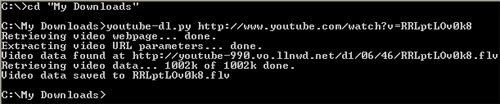
Use youtube-dl followed by a video URL. Example: youtube-dl "http://www.youtube.com/watch?v=foobar". The video will be saved to the file foobar.flv in that example. As YouTube.com videos are in Flash Video format, their extension should be flv. In Linux and other unices, video players using a recent version of ffmpeg can play them. That includes MPlayer, VLC, etc. Those two work under Windows and other platforms, but you could also get a specific FLV player of your taste.
Here's the screenshot on my initial testing:


wow we can download video from youtube yihaaaaa
ReplyDeletethat's good news for me and i want it.wil, do u have that file to install? give it to me ya
thank u
of course
ReplyDeleteyou can download the script from the site also. It's very very small. You will need to install Python interpreter first before you can start using it
One of the easiest is to use a Web-based interface like this one:
ReplyDeletehttp://www.videodl.org/
You can also use FireFox's plugin named Ookk? Video Ook! which can download the movie from youtube and similar website.
ReplyDeleteThanks for all of the information. I hope it will be useful for other people as well
ReplyDeletei just use "zillatube" . it's a software to download from youtube very quickly.
ReplyDeleteYou can also use it to play or convert youtube videos.
by the way, you can get it at
http://www.zillatube.com
I have found an excelent tools for converting my youtube movies convertmovies.org . mp3, mp4, avi, mov, wma, ipod supported. Great!
ReplyDeleteIt's easy to Download YouTube, good stuff
ReplyDelete